Work Order
Detailed description of API:
Version & Updates
Details
| Version | Revision Date | Revision History |
|---|---|---|
| 1.0 | October 2026 | New Release |
| Version | Revision Date | Revision History |
|---|---|---|
| 1.0 | 08 Oct 2026 | New Release |
Overview
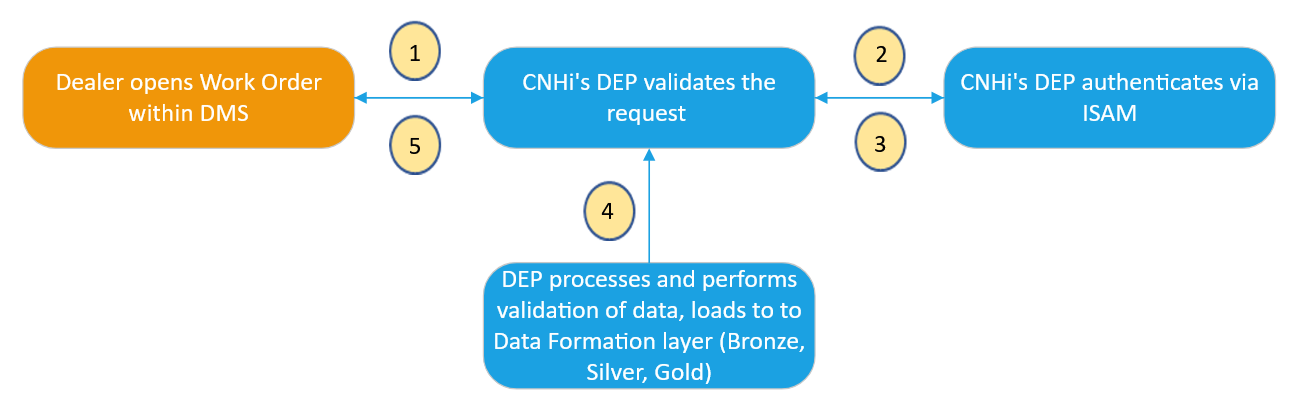
Workorder API is structured to capture the information about the critical attributes used in the work order at the time of creation in any DMS systems. Whereas this API, along with the vehicle parameters details collected from CNHI, will also include the additional details that are captured exclusively by the DMS in the Workorder like the details of the repair, technician, payment, and customer etc.
Please refer to diagram below for information on the data flow of this interface.
Pre-requisites
- Dealer must use their Dealer Portal credentials to authorize API call.
- Each DMS provider will have a subscription_key assigned by CNHi team, please reach out to dlnadmssupport@cnh.com for assistance
- Each Subscription key is unique to DMS and the environment it belongs to
- Based on the payload (XML/JSON), user to pass the content-type in the header
- User within Ownership Group has accepted CNH's Data Acknowledgement (if located in NAFTA)
Authentication
- DMS will pass Basic auth in HTTP header with username/password
- Each DMS provider will have a subscription_key assigned by CNHi team, please reach out to dlnadmssupport@cnh.com for assistance
- The UserID and Password will be set up in the Dealer Portal by the Dealer uniquely for DMS access to interfaces
- DEP API will require subscription_key in HTTP header to identify client
Work Order Validation
CNHi has 3 different pieces of validation to ensure DMS are configured to send corresponding details about the Dealer performing the repair.
-
UserID Matching within Work Order
a. The UserID that is used to authorize with & the UserID provided in the header of the Work Order payload, have to match
b. CNHi will not accept Work Orders that do not have corresponding UserIDs
-
DocumentID (i.e. Work Order ID) must have a unique value
a. This is a mandatory field, every work order needs to have a unique DocumentID because it is a primary key of Work Order
b. We are expecting this to be an alphanumeric value, i.e. something like 115070287
-
UserID & Corresponding Ownership Group Validation
a. Dealer Code's Ownership Group must match with the associated submitted UserID’s Ownership Group in the header of the Work Order payload
b. The provided Dealer Code (SAP Primary) and submitting UserID should belong to the same Ownership Group (OG)
API Format
- REST
The DEP takes care of the format transformations (as needed) to process the request and provide a response to the DMS system. New DMSs who are building this interface are recommended to the use the REST API for greater simplicity.
Connection Details
Endpoints
| Environment | URL | API | Request Type |
|---|---|---|---|
| CERT/UAT | TBD | REST | POST |
| Production | TBD | REST | POST |
Request Body
Although the Work Order API supports both JSON and XML, CNHi preferred format is JSON.
Sample JSON Payload
Download Workorder JSON Payload / BodyWork/Repair Order Attributes
Please refer to Tab 1 "Work Order Attributes List" to get all the work order attribute information. Tab 2, 3 and 4 provides attributes structure in tree format for better readability.
Download Work Order AttributesResponse Codes
| Status Code | Message |
|---|---|
| 200 | Work Order uploaded successfully! |
| 400 | Please Provide DMS Name and Dealer Code |
| 500 | Internal Server Error |
| 401 | Access denied due to invalid UserID or Password. |
| 403 | Forbidden |
Work Order Historical Upload
- Historical data should NOT be sent via Work Order API.
- Only Closed Work Orders are expected to be sent to CNH as part of Historical Data.
DMS/Dealer should send historical Workorder data to CNH DEP using any of the two following methods.
Method 1: 17 Files in CSV format
a. DMS/Dealer needs to send Work Order data segregated in the 17 CSV files.
i. Structure and format of 17 CSV files.
ii. 17 CSV files Sample Data.
b. To efficiently manage workorder data processing, DMS can segment work order records into periodic batches; such as quarterly (3 months) or semiannually (6 months) intervals and same work order data related information need to be available in 17 CSV files. Please ensure that no data is lost across any of the 17 files.
c. Attributes highlighted in the Green color font in each tab of "17 CSV" files are composite primary keys for the respective file/table. Those attributes are mandatory and should not be NULL.
d. Please follow the file nomenclature as shown in the information box below
WO_<DMSName><DealerName><primarySAPNumber><DataFromDate>to<DataToDate><File Transfer DateTime>.zip
Note: The <primarySAPNumber> field is optional if the DMS/Dealer is sending the data at the OG level by combining all locations data in a single file.
e. For a detailed breakdown of each data field and its attributes, please refer to the attributes sheet.
f. Please contact CNH support team by providing DMS Name, Dealer name and SAP Ownershipgroup number to setup SFTP.
Method 2: JSON Method
a. DMS can send the historical work orders in JSON format through azure EventHub.
b. Payload structure remains same as the API request payload structure. Sample JSON Workorder Payload
c. DMS has to set the partition key for each Event/Work Order Payload. Partition key should be "<dealercode><workordernumber>".
Please refer the sample C# code below for your reference. However DMS can choose the any other langauge as per their convenience.
  var producerClient = new EventHubProducerClient("CONNECTION_STRING", "EVENTHUB_NAME");

  var batchOptions = new CreateBatchOptions
  {
      PartitionKey = "<dealercode><workordernumber>"
  };

  using EventDataBatch eventBatch = await producerClient.CreateBatchAsync(batchOptions);
  var payloadjson = "Work Order Json";
  var data = new EventData(Encoding.UTF8.GetBytes(payloadjson));
  data.Properties.Add("EventType", "WorkOrder");

  var response = eventBatch.TryAdd(data);
  if(response == true) // Payload size is less than 1 MB
  {
   await producerClient.SendAsync(eventBatch);
  }
  else // Payload size is greater than 1 MB
  {
      //Add to ZIP file to post through SFTP later.
  }
d. If the size of the payload exceeds 1 MB, the "TryAdd" method as shown in the above code snippet will give "FALSE" response. DMS/Dealer must store the failed payload in the JSON file format, ZIP all such JSON payload files together and transfer them via SFTP.
e. Please follow the file nomenclature as shown in the information box below for posting the files via SFTP.
WO_<DMSName><DealerName><primarySAPNumber><DataFromDate>to<DataToDate><File Transfer DateTime>.zip
Note: The <primarySAPNumber> field is optional if the DMS/Dealer is sending the data at the OG level by combining all locations data in a single file.
f. For a detailed breakdown of each data field and its attributes, please refer to the attributes sheet.
g. Please contact CNH support team for EventHub and SFTP connection details.