CRM
Detailed description of API:
Version & Updates
| Version | Revision Date | Revision History |
|---|---|---|
| 1.0 | 12th Sep 2023 | New Release |
Overview
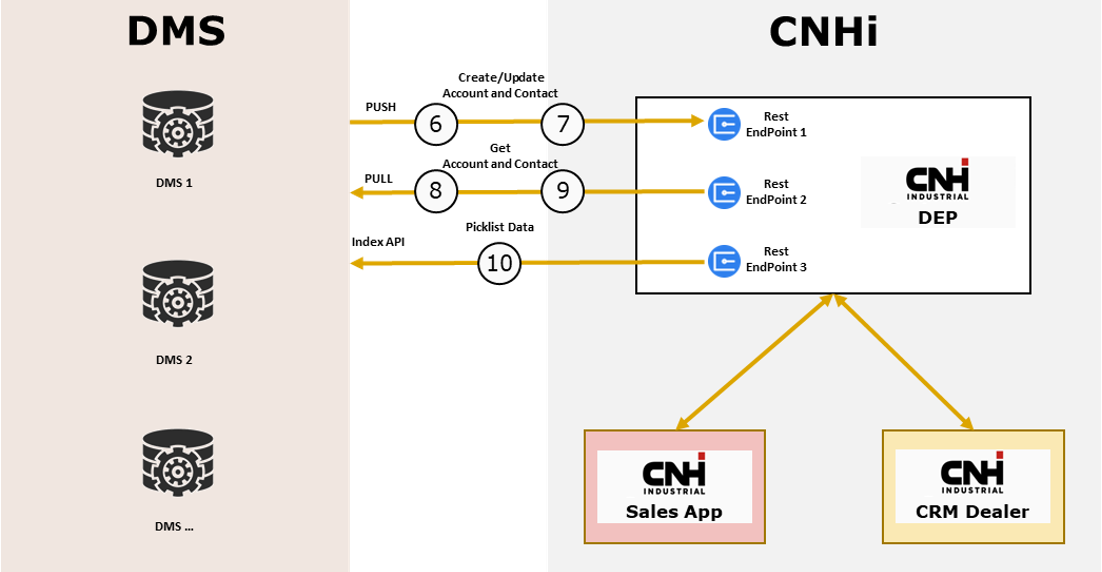
DMS integration aims to create an integration between the Dealer DMS and the CNHi CPQ application (Microsoft Dynamics CRM 365 Dealer and SalesApp) using the Data Exchange Platform (DEP) as middleware, and to provide the details of the API layer available to handle Accounts, Contacts, Domain Objects data in the scenario of DEP | DMS | CRM | SalesApp integration.
Integration between DMS & CNHi systems generates the following advantages for Dealers:
- Avoids double entry of Customer information
- Increase efficiency for Offer Management
- Increase acknowledgement for Order Status
Pre-requisites
Pre-requisites
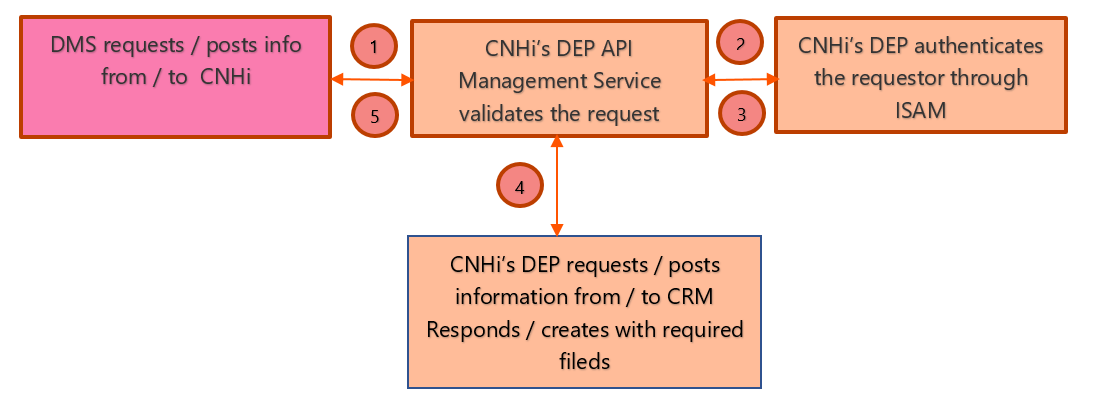
- DEP API will require subscription-API-key in HTTP header to identify client and to be able to track API usage.
- DMS will pass Basic auth in HTTP header for username/password.
- The User ID and Password is the one provided by CNHi Dealer Portal team to authenticate/authorize access to CNHi applications against ISAM.
- The User Id must be aligned to Data Sharing Agreement to access the API.
- Based on the payload (XML/JSON) pass the content-type in the header.
- Query Parameters/Request Body as provided in the specification details below are passed to call API.
- The assumption underlying this document is that integration with individual DEALERS is centralized by the DMS, which for us acts as Client. Consequently, it is expected that requests transmitted to our interfaces are controlled by the DMS itself to ensure that the requester has the necessary authorizations to send and retrieve the requested data.
Authentication
Authentication
- DMS will pass Basic auth in HTTP header with username/password
- Each DMS provider will have a subscription_key assigned by CNHi team, please reach out to EMEA DMS Support for assistance
- The UserID and Password will be set up in the Dealer Portal by the Dealer uniquely for DMS access to interfaces
- DEP API will require subscription_key in HTTP header to identify client
API Format
- REST
The DEP takes care of the format transformations (as needed) to process the request and provide a response to the DMS system.
API Integration - Technical Notes
Following the main point of DEP API layer Interface agreement:
-
API will handle json format as content-type
-
API will handle the search and pagination as per given rule:
- Search filter: search criteria based on json properties:
- i.e. ?dmsCode=
{string}
- i.e. ?dmsCode=
- Search filter: search criteria based on json properties:
-
Pagination: it will be possible to drive the pagination, with the following required parameters:
- pageNumber: client page request number
- fetchSize: fetch size
- i.e. ?fetchDate= YYYY-MM-DD&pageNumber=
{int}& fetchSize=100
-
API will return in a dedicated section of the response the total number of the rows found with a given request adding the current paging and the fetch size. Example:
{
  "parameters": {
    "pageNumber": 1,
    "totalPages": 1,
    "pageSize": 100,
    "totaItems": 2
  }
}
- API http protocol status code will be present in the response, same as the message related to the operation executed.
- When constructing a request for any of our API endpoints that support the fetchDate parameter, it's crucial to properly format this parameter to ensure accurate data retrieval
- The fetchDate parameter is designed to accept dates in the ISO 8601 format, which should look like "YYYY-MM-DD" (for example, "2024-04-10").
- The specified date should be in Coordinated Universal Time (UTC)
- By including this parameter in your API call, you're instructing the system to return only the entities that have been modified after the specified date
Historical Data Load - Technical Specifications
Import Historical data (existing data) of Accounts and Contacts from the DMS application into CNHi DEP platform is required for the purpose of maintaining single source of information collated from DMS and CNHi CRM applications, and thus provide information real-time via API calls described in further sections in this document.
This import is a one-time operation to be performed as initial load before starting the sync between DMS data and Staging Area. It could also be needed if some error occurs between the two systems and we need to re-sync everything from the beginning but, in any case, is a technical operation that should be agreed from both parts and will be executed manually from DEP side.
Steps to import DMS Historical Data into DEP:
Accounts:- DMS user to export Accounts Data from DMS application in csv format (filename: “dmsDmdOutletCode_dmsCode_accounts_YYYY_MM_DD.csv”). Zip this file to dmsDmdOutletCode_dmsCode_accounts _YYYY_MM_DD.zip
Note: “YYYY_MM_DD” indicate file generation date
-
Upload the zip into CNHi provided SFTP location
a. CNHi provides path and credentials to access SFTP
- DMS user to export Contacts Data from DMS application in csv format (filename: “dmsDmdOutletCode_dmsCode_contacts_YYYY_MM_DD.csv”). Zip this file to dmsDmdOutletCode_dmsCode_contacts_YYYY_MM_DD.zip
Note: “YYYY_MM_DD” indicate file generation date
-
Upload the zip into CNHi provided SFTP location
a. CNHi provides path and credentials to access SFTP
Note: An email communication to CNHi is required to inform any new file upload, so that file can be processed.
Connection Details
For DMS CRM we have 6 APIs:
- Account Index API
- Create Account API
- Get Account API
- Contact Index API
- Create Contact API
- Get Contact API
CNHi provides two environments:
- CERT / UAT
- Production
Account Index API
Account Index API allows users to retrieve domain objects for the feature environment to the DMS, in order to help while creating an account. DMSs can fetch single/multiple option set values based on the entity(account).
| Environment | URL | API | Request Type |
|---|---|---|---|
| CERT/UAT | https://{base_url}/emeaexternal/services/crm/index/account | REST | GET |
| Production | https://{base_url}/emeaexternal/services/crm/index/account | REST | GET |
Request Parameters
| Parameter Name | Params Type | Type | Is Required (Y|N) | Default Value | Comments |
|---|---|---|---|---|---|
| optionSetName | Query | String | N | - | Option Set Name. Possible Values for Account: brand, accountTypeCode, addressCountry, relationshipTypeCode, stateCode, statusCode, preferredLanguageCode, legalFormCode and businessTypeMultiCode. |
Option Set Name allowed values:
| Entity Name | Optionset Name allowed values | Description |
|---|---|---|
| Accounts | brand | Brand |
| Accounts | accountTypeCode | Account Type |
| Accounts | addressCountry | Country |
| Accounts | relationshipTypeCode | Relationship Type |
| Accounts | stateCode | Account State-Status Code |
| Accounts | statusCode | Account State-Status Code |
| Accounts | preferredLanguageCode | PreferredLanguage |
| Accounts | legalFormCode | Legal Form |
| Accounts | businessTypeMultiCode | Business Type |
Note:
-
To fetch all the picklists values for an account, do not pass any value for OptionSetName query parameter.
-
To fetch specific picklists, provide OptionSetName (eg: brand, accountTypeCode, addressCountry, relationshipTypeCode, stateCode, statusCode, preferredLanguageCode, legalFormCode and businessTypeMultiCod) in query string. We can pass multiple OptionSetName.
Response Description
| JSON Property | Description |
|---|---|
| collectionName | Valorized with “index” |
| Items | List of items that are matching the request; empty list for no data found scenario. Please note that the structure of items in list is composed of domain object Items. |
| paginationProperties | Set of metadata required to handle client pagination |
| statusCode | HTTP status code |
| Message | Status Message |
Success Response Structure
| Name | Type | Description |
|---|---|---|
| collectionName | String | Collection Name – Index |
| Items.entityName | String | Entity Name |
| Items.optionSetName | String | Option Set Name |
| Items.option | String | Option |
| Items.localizedlabellanguagecode | String | Localized Label Language Code |
| Items.localizedlabel | String | Localized Label |
| paginationProperties.pageNumber | Integer (Int32) | Page Number |
| paginationProperties.totalPages | Integer (Int32) | Total Pages |
| paginationProperties.pageSize | Integer (Int32) | Page Size |
| paginationProperties.totalItems | Integer (Int32) | Total Items |
| statusCode | String | Status Code |
| Message | String | Message |
Success Sample Response
Download Account Index Sample Success ResponseFailure Response Structure
| Name | Type | Description |
|---|---|---|
| collectionName | String | Collection Name – Index |
| Items | Array | Empty Items - "items": [] |
| paginationProperties.pageNumber | Integer (Int32) | Page Number |
| paginationProperties.totalPages | Integer (Int32) | Total Pages |
| paginationProperties.pageSize | Integer (Int32) | Page Size |
| paginationProperties.totalItems | Integer (Int32) | Total Items |
| statusCode | String | Status Code |
| Message | String | Message |
Failure Sample Response
Download Account Index Sample Failure ResponseResponse Codes
| Scenario | HTTP Status Code | Message |
|---|---|---|
| No Data Found | 404 | No Data Found |
| Unable to perform search | 500 | Internal Server Error |
| Operation performed | 200 | Operation successfully performed |
Create / Update Account API
Using the Create / Update Account API, a DMS System can submit a request to create an account. DMSs can push only one account information per request.
| Environment | URL | API | Request Type |
|---|---|---|---|
| CERT/UAT | https://{base_url}/emeaexternal/services/crm/account | REST | POST |
| Production | https://{base_url}/emeaexternal/services/crm/account | REST | POST |
Request Body
      {
        "dmsCode": "dmscode",

        "dmsAccountId ": " testaccount ",

        "dmsDmdOutletCode": "NHAG-FRA-000000-00",

        "brand": 1,

        "accountName": "my name",

        "accountTypeCode": 10,

        "addressCountry": 201,

        "addressStateOrProvince": "Paris",

        "addressCity": "Paris",

        "addressLine": "Boulevard de la Madeleine",

        "addressPostalCode": "75001",

        "createdOn": "YYYY-MM-DD hh:mm:ss (UTC)",

        "modifiedOn": "YYYY-MM-DD hh:mm:ss (UTC)",

        "relationshipTypeCode": 4,

        "emailAddress": "test@test.com",

        "addressTelephone": "",

        "primaryContactId" : "",

        "taxCode": "fr11234556755",

        "vatCode": "FR12345678912",

        "siren": "123456789",

        "siret": "12345678901234",

        "stateCode": 1,

        "statusCode": 1,

        "preferredLanguageCode": 83,

        "legalFormCode": -1,

        "businessTypeMulticode": 2
    }
- Payload (XML/JSON) determined by content-type in the header of the request:
- Content-Type application/JSON
Sample Create Account API Request Body
Download Sample Create Account JSON Request BodyData Format and Validation
The below table shows the mandatory fields, datatypes and input format, as a minimum requirement to consider the Input as valid to create account.
| Property name – JSON body | Description | DEP/DMS Mandatory | Field Type | Field Format/Expected Value |
|---|---|---|---|---|
| dmsCode | DMScode | Y | Text | Max length: 500 |
| dmsAccountId | ID Account External - Accountid | Y | Text | Max length: 500 |
| dmsDmdOutletCode | Business Unit | Y | Text | |
| Brand | Brand | Y | Int | Picklist |
| accountName | Account Name | Y | Text | String - Max length: 200 |
| accountTypeCode | Account Type | Y | Int | Picklist |
| addressCountry | Country | Y | Text | Picklist |
| addressStateOrProvince | Province | Text | Max length: 50 | |
| addressCity | City | Y | Text | Max length: 80 |
| addressLine | Street | Y | Text | Max length: 500 |
| addressPostalCode | Postal Code | Y | Text | Max length: 20 |
| createdOn | Creation Date | Y | datetime | YYYY-MM-DD hh:mm:ss (UTC) |
| modifiedOn | Modified Date | Y | datetime | YYYY-MM-DD hh:mm:ss (UTC) |
| relationshipTypeCode | Relationship Type | Int | Picklist | |
| emailAddress | Text | Max length: 100 | ||
| addressTelephone | Main Phone | Y | Text | Max length: 50 |
| primaryContactId | primarycontactid | Text | For example: 6F9619FF-8B86-D011-B42D-00C04FC964FF | |
| taxCode | Tax Code | Text | Max length: 100 | |
| vatCode | VAT Code | Text | Max length: 100 | |
| Siren | Siren | Text | Max length: 100 | |
| Siret | Siret | Text | Max length: 100 | |
| stateCode | Status | Y | Int | Picklist |
| statusCode | Status reason | Y | Int | Picklist |
| preferredLanguageCode | Preferred Language | Int | Picklist | |
| legalFormCode | Legal Form | Int | Picklist | |
| businessTypeMultiCode | BusinessType | Int | Picklist |
Success Response Structure
The API response has the following structure:
| Json Property | Description |
|---|---|
| statusCode | HTTP status code |
| Message | Status Message |
| Errors | Array with errors details |
Success Sample Response
Download Create Account Sample Success ResponseFailure Response Structure
Error Item Structure
| Json Property | Description |
|---|---|
| instancePath | Property where the error occurred |
| schemaPath | Property path |
| Keyword | Array with errors details |
| Params | Array with additional error details – e.g. max length for string check |
| Message | Descriptive message for error |
Failure Sample Response
Download Create Account Failure Success ResponseCreate Account API Attributes
Download Create Account API AttributesResponse Codes
| Scenario | HTTP Status Code | Message |
|---|---|---|
| Not a JSON | 400 | Validation failed |
| Invalid JSON | 500 | Internal Server Error |
| Mandatory fields Missing, Data Type, or Format Mismatch | 400 | Validation failed |
| Try to create an existing Account, already saved in CRM | 400 | Cannot create Account due to {accountid_DMS} already linked in SalesApp. To update visit SalesApp. |
| All validation passed | 200 | Account saved successfully |
Get Account API
The goal of this API is to retrieve information related to the single/ multiple accounts and populate it to the DMS. DMS can query the account information based on dmsDmdOutletCode, dmsCode, dmsAccountId, and fetchDate.
| Environment | URL | API | Request Type |
|---|---|---|---|
| CERT/UAT | https://{base_url}/emeaexternal/services/crm/account-linked? | REST | GET |
| Production | https://{base_url}/emeaexternal/services/crm/account-linked? | REST | GET |
Request Parameters
| Parameter Name | Params Type | Type | Is Required (Y|N) | Default Value | Comments |
|---|---|---|---|---|---|
| dmsDmdOutletCode | Query | String | Y | - | |
| dmsCode | Query | String | N | - | |
| dmsAccountId | Query | String | N | - | If valorized, it allows to fetch specific account data list associated to given account id |
| fetchdate | Query | String (Date Time) | N | - | If valorized, it allows to fetch accounts modified after the provided date mm |
| fetchSize | Query | Int | N | - | It becomes mandatory for request to fetch data for given date |
| pageNumber | Query | Int | N | - | It becomes mandatory for request to fetch data for given date |
Note:
-
To fetch single account, provide value for dmsDmdOutletCode, dmsCode, dmsAccountId. You can skip the fetchDate, fetchSize and pageNumber.
-
To fetch accounts modified after the provided date, provide values for dmsDmdOutletCode, dmsCode, fetchDate, fetchSize and pageNumber (pagination feature: it specifies the requested page number, starting from 1, and is needed for splitting the output in pages when the result set exceed a prefixed number of documents).
Response Description
| Json Property | Description |
|---|---|
| collectionName | Valorized with “accounts” |
| Items | List of items that are matching the request; empty list for no data found scenario. Please note that the structure of items in list is composed of account items. |
| paginationProperties | Set of metadata required to handle client pagination |
| statusCode | HTTP status code |
| Message | Status Message |
Success Response Structure
| Json Property | Type | Description |
|---|---|---|
| collectionName | String | Collection Name – accounts |
| Items.dmsCode | String | DMS Code |
| Items.dmsAccountId | String | DMS Account Id |
| Items.dmsDmdOutletCode | String | DMS DMD Outlet Code |
| Items.brand | Integer (Int32) | Brand |
| Items.accountName | String | Account Name |
| Items.accountTypeCode | Integer (Int32) | Account Type Code |
| Items.addressCountry | Integer (Int32) | Address Country |
| Items.addressStateOrProvince | String | Address State or Province |
| Items.addressCity | String | Address City |
| Items.addressLine | String | Address Lane |
| Items.addressPostalCode | String | Address Postal Code |
| Items.createdOn | String (Date) | Created Date |
| Items.modifiedOn | String | Modified On |
| Items.relationshipTypeCode | Integer (Int32) | Relationship Type Code |
| Items.emailAddress | String | Email Address - "xxxxyyyyy@soso-aaa.bbb.com", |
| Items.addressTelephone | String | Address Telephone - "000-000-0000", |
| Items.taxCode | String | Tax Code |
| Items.vatCode | String | VAT Code |
| Items.siren | Boolean | Siren |
| Items.siret | Boolean | Siret |
| Items.stateCode | Integer (Int32) | State Code |
| Items.statusCode | Integer (Int32) | Status Code |
| Items.preferredLanguageCode | Integer (Int32) | Preferred Language Code |
| Items.legalFormCode | Integer (Int32) | Legal Form Code |
| Items.businessTypeMulticode | Integer (Int32) | Business Type Multicode |
| paginationProperties.pageNumber | Integer (Int32) | Page Number |
| paginationProperties.totalPages | Integer (Int32) | Total Pages |
| paginationProperties.pageSize | Integer (Int32) | Page Size |
| paginationProperties.totalItems | Integer (Int32) | Total Items |
| statusCode | String | Status Code |
| Message | String | Message |
Success Sample Response
Download Get Account API Sample Success ResponseFailure Response Structure
| Json Property | Type | Description |
|---|---|---|
| collectionName | String | Collection Name |
| Items | Array | Empty Items - "items": [] |
| paginationProperties.pageNumber | Integer (Int32) | Page Number |
| paginationProperties.totalPages | Integer (Int32) | Total Pages |
| paginationProperties.pageSize | Integer (Int32) | Page Size |
| paginationProperties.totalItems | Integer (Int32) | Total Items |
| statusCode | String | Status Code |
| Message | String | Message |
Failure Sample Response
Download Get Account API Sample Failure ResponseResponse Codes
| Scenario | HTTP Status Code | Message |
|---|---|---|
| No Data Found | 404 | No Data Found |
| Unable to perform search | 500 | Internal Server Error |
| Mandatory fields Missing, | 400 | Validation failed |
| Operation performed | 200 | Operation successfully performed |
Contact Index API
Contact Index API allows a user to retrieve domain objects for the feature environment to the DMS, in order to help while creating an account. DMSs can fetch single/multiple option set values based on the entity(contact).
| Environment | URL | API | Request Type |
|---|---|---|---|
| CERT/UAT | https://{base_url}/emeaexternal/services/crm/index/contact | REST | GET |
| Production | https://{base_url}/emeaexternal/services/crm/index/contact | REST | GET |
Request Parameters
| Parameter Name | Params Type | Type | Is Required (Y|N) | Default Value | Comments |
|---|---|---|---|---|---|
| optionSetName | Query | String | N | - | Option Set Name. Possible Values for Contacts: brandCode, stateCode, statusCode and addressCountry. |
Option Set Name allowed values.
| Entity Name | Option Set Name allowed values | Description |
|---|---|---|
| Contacts | brandCode | Brand |
| Contacts | stateCode | Contact State-Status Code |
| Contacts | statusCode | Contact State-Status Code |
| Contacts | addressCountry | Country |
Note:
-
To fetch all the picklists values for an contact, do not pass any value for OptionSetName query parameter.
-
To fetch specific picklists, provide OptionSetName (eg: brandCode, stateCode, statusCode and addressCountry) in query string. We can pass multiple OptionSetName.
Response Description
| Json Property | Description |
|---|---|
| collectionName | Valorized with “index” |
| Items | List of items that are matching the request; empty list for no data found scenario. Please note that the structure of items in list is composed of domain object Items. |
| paginationProperties | Set of metadata required to handle client pagination |
| statusCode | HTTP status code |
| message | Status Message |
Success Response Structure
| Name | Type | Description |
|---|---|---|
| collectionName | String | Collection Name – Index |
| Items.entityName | String | Entity Name |
| Items.optionSetName | String | Option Set Name |
| Items.option | String | Option |
| Items.localizedlabellanguagecode | String | Localized Label Language Code |
| Items.localizedlabel | String | Localized Label |
| paginationProperties.pageNumber | Integer (Int32) | Page Number |
| paginationProperties.totalPages | Integer (Int32) | Total Pages |
| paginationProperties.pageSize | Integer (Int32) | Page Size |
| paginationProperties.totalItems | Integer (Int32) | Total Items |
| statusCode | String | Status Code |
| Message | String | Message |
Success Sample Response
Download Contact Index API Sample Success ResponseFailure Response Structure
| Name | Type | Description |
|---|---|---|
| collectionName | String | Collection Name – Index |
| Items | Array | Empty Items - "items": [] |
| paginationProperties.pageNumber | Integer (Int32) | Page Number |
| paginationProperties.totalPages | Integer (Int32) | Total Pages |
| paginationProperties.pageSize | Integer (Int32) | Page Size |
| paginationProperties.totalItems | Integer (Int32) | Total Items |
| statusCode | String | Status Code |
| Message | String | Message |
Failure Sample Response
Download Contact Index API Sample Failure ResponseCreate / Update Contact API
Using the Create / Update Contact API, a DMS System can submit a request to create a contact or update an existing one. DMS can push only one account information per request.
| Environment | URL | API | Request Type |
|---|---|---|---|
| CERT/UAT | https://{base_url}/emeaexternal/services/crm/contact | REST | POST |
| Production | https://{base_url}/emeaexternal/services/crm/contact | REST | POST |
Request Body
    {
      "dmsCode": "MISTRAL",
      "dmsContactId": "guuid",
      "dmsAccountId": "guuid",
      "dmsDmdOutletCode": "guuid",
      "createdOn": "YYYY-MM-DD hh:mm:ss",
      "modifiedOn": "YYYY-MM-DD hh:mm:ss",
      "firstName": "",
      "lastName": "",
      "brandCode": 0,
      "addressCountry": "",
      "addressStateOrProvince": "",
      "addressCity": "",
      "addressPostalcode": "",
      "addressLine": "",
      "primaryContact": true,
      "mobilePhone": "",
      "addressTelephone": "",
      "emailAddress": "",
      "isCnhiDirectMarketingConsent": 0,
      "isCnhiThirdMarketingConsent": 0,
      "consentDate": "YYYY-MM-DD hh:mm:ss",
      "isDealerDirectMarketingConsent": 0,
      "isDealerThirdMarketingConsent": 1,
      "dealerConsentDate": "YYYY-MM-DD hh:mm:ss",
      "channelPrivacyDate": "YYYY-MM-DD hh:mm:ss",
      "contactByEmail": 0,
	    "contactByCall": 0,
      "contactBySms": 0,
      "stateCode": 1,
      "statusCode": 1
    }
Sample Create / Update Contact API Sample JSON Request
Data Format & Validation
| Property name – JSON body | Description | DEP/DMS Mandatory | Field Type | Field Format/Expected Value |
|---|---|---|---|---|
| dmsCode | DMScode | Y | text | Max length: 500 |
| dmsContactId | ID contact External – contacted | Y | text | Max length: 500 |
| dmsAccountId | ID Account External - Accountid | Y | text | Max length: 500 |
| dmsDmdOutletCode | Business Unit | Y | text | |
| createdOn | Creation Date | Y | datetime | YYYY-MM-DD hh:mm:ss (UTC) |
| modifiedOn | Modification Date | Y | datetime | YYYY-MM-DD hh:mm:ss (UTC) |
| firstName | Firstname | Y | text | Max length: 50 |
| lastName | Lastname | Y | text | Max length: 50 |
| brandCode | Brand | Y | int | Picklist |
| addressCountry | Country | Y | text | Max length: 50 |
| addressStateOrProvince | Province | text | Max length: 50 | |
| addressCity | City | Y | text | Max length: 50 |
| addressPostalCode | Postal Code | Y | text | Max length: 20 |
| addressLine | Street | Y | text | Max length: 250 |
| primaryContact | primary contact | Boolean | ||
| mobilePhone | Mobile | Y | text | Max length: 50 |
| addressTelephone | Landing Line | text | Max length: 50 | |
| emailAddress | Y | text | Max length: 506 | |
| isCnhiDirectMarketingConsent | CNHi Direct marketing Consent | bit | 0=no 1=yes FALSE=no TRUE=yes | |
| isCnhiThirdMarketingConsent | CNHi Third marketing Consent | bit | 0=no 1=yes FALSE=no TRUE=yes | |
| consentDate | CNHi Consent Date | datetime | YYYY-MM-DD hh:mm:ss (UTC) | |
| isDealerDirectMarketingConsent | Dealer Direct Marketing Consent | bit | 0=no 1=yes FALSE=no TRUE=yes | |
| isDealerThirdMarketingConsent | Dealer Third Marketing Consent | bit | 0=no 1=yes FALSE=no TRUE=yes | |
| dealerConsentDate | Dealer Consent Date | datetime | YYYY-MM-DD hh:mm:ss (UTC) | |
| channelPrivacyDate | Channel Privacy Date | datetime | YYYY-MM-DD hh:mm:ss (UTC) | |
| contactByEmail | Contact by Email | bit | 0=no 1=yes FALSE=no TRUE=yes | |
| contactByCall | Contact by Call | bit | 0=no 1=yes FALSE=no TRUE=yes | |
| contactBySms | Contact by SMS | bit | 0=no 1=yes FALSE=no TRUE=yes | |
| stateCode | Status | Y | Int | Picklist |
| statusCode | Status Reason | Y | Int | Picklist |
Success Response Structure
| Json Property | Description |
|---|---|
| statusCode | HTTP status code |
| Message | Status Message |
| Errors | Array with errors details |
Success Sample Response
Download Create / Update Contact API Success Sample ResponseFailure Response Structure
| Json Property | Description |
|---|---|
| instancePath | Property where the error occurred |
| schemaPath | Property path |
| Keyword | Array with errors details |
| Params | Array with additional error details – e.g. max length for string check |
| Message | Descriptive message for error |
Failure Sample Response
Download Create / Update Contact API Failure Sample ResponseCreate / Update Contact API Attributes
Download Create / Update Contact API AttributesResponse Codes
| Scenario | HTTP Status Code | Message |
|---|---|---|
| Not a JSON | 400 | Validation failed |
| Invalid JSON | 500 | Internal Server Error |
| Mandatory fields Missing, Data Type, or Format Mismatch | 400 | Validation failed |
| Try to create an existing Account, already saved in CRM | 400 | Cannot create Account due to {accountid_DMS} already linked in SalesApp. To update visit SalesApp. |
| All validation passed | 200 | Account saved successfully |
Get Contact API
The goal of this API is to retrieve information related to the single/ multiple contact wihtin a DMS. DMSs can query the account information based on dmsDmdOutletCode, dmsCode, dmsAccountId,dmsContactId and fetchDate.
| Environment | URL | API | Request Type |
|---|---|---|---|
| CERT/UAT | https://{base_url}/emeaexternal/services/crm/contact-linked | REST | GET |
| Production | https://{base_url}/emeaexternal/services/crm/contact-linked | REST | GET |
Request Parameters
| Parameter Name | Params Type | Type | Is Required (Y|N) | Default Value | Comments |
|---|---|---|---|---|---|
| dmsDmdOutletCode | Query | String | Y | - | |
| dmsCode | Query | String | N | - | |
| dmsAccountId | Query | String | N | - | If valorized, it allows to fetch specific account data list associated to given account id |
| dmsContactId | Query | String | |||
| fetchdate | Query | String (Date Time) | N | - | If valorized, it allows to fetch accounts modified after the provided date |
| fetchSize | Query | Int | N | - | It becomes mandatory for request to fetch data for given date |
| pageNumber | Query | Int | N | - | It becomes mandatory for request to fetch data for given date |
Note:
-
To fetch single contact, provide value for dmsDmdOutletCode, dmsCode, dmsAccountId and dmsContactId.
-
To fetch all contacts of an Accounts, provide value for dmsDmdOutletCode, dmsCode, dmsAccountId and pageNumber (pagination feature: it specifies the requested page number, starting from 1, and is needed for splitting the output in pages when the result set exceed a prefixed number of documents).
-
To fetch all contacts modified after the provided date, provide values for dmsDmdOutletCode, dmsCode, fetchDate and pageNumber (pagination feature: it specifies the requested page number, starting from 1, and is needed for splitting the output in pages when the result set exceed a prefixed number of documents).
Response Description
| Json Property | Description |
|---|---|
| collectionName | Valorized with “accounts” |
| Items | List of items that are matching the request; empty list for no data found scenario. Please note that the structure of items in list is composed of account items. |
| paginationProperties | Set of metadata required to handle client pagination |
| statusCode | HTTP status code |
| Message | Status Message |
Success Response Structure
| Json Property | Type | Description |
|---|---|---|
| collectionName | String | Collection Name – contacts |
| Items.dmsCode | String | DMS Code |
| Items. dmsContactId | String | Dms Contact Id |
| Items.dmsAccountId | String | DMS Account Id |
| Items.dmsDmdOutletCode | String | DMS DMD Outlet Code |
| Items.createdOn | String (Date) | Created Date |
| Items.modifiedOn | String (Date) | Modified On |
| Items.firstName | String | First Name |
| Items.lastName | String (Date) | Last Name |
| Items.brandCode | Integer (Int32) | Brand |
| Items.addressCountry | String | Address Country |
| Items.addressStateOrProvince | String | Address State or Province |
| Items.addressCity | String | Address City |
| Items.addressLine | String | Address Lane |
| Items.addressPostalCode | String | Address Postal Code |
| Items.primaryContact | Boolian | Is primary Contact? |
| Items.mobilePhone | String | Mobile Phone - "000-000-0000", |
| Items.addressTelephone | String | Address Telephone - "000-000-0000", |
| Items.emailAddress | String | Email Address - "xxxxyyyyy@soso-aaa.bbb.com", |
| Items.gdprIsPrivacyNoteDelivered | Integer (Int32) | GdprIs Privacy Note Delivered |
| Items.isCnhiDirectMarketingConsent | Boolian | Is Cnhi Direct Marketing Consent? |
| Items.isCnhiThirdMarketingConsent | Boolian | Is Cnhi Third Marketing Consent? |
| Items.consentDate | String (Date) | Consent Date |
| Items.cnhiConsentSourceCode | Integer (Int32) | Cnhi Consent Source Code |
| Items.isDealerDirectMarketingConsent | Boolian | Is Dealer Direct Marketing Consent? |
| Items.isDealerThirdMarketingConsent | Boolian | Is Dealer Third Marketing Consent? |
| Items.dealerConsentDate | String (Date) | Dealer Consent Date |
| Items.dealerConsentSourceCode | Integer (Int32) | Dealer Consent Source Code |
| Items.channelPrivacyDate | String (Date) | Channel Privacy Date |
| Items.contactByEmail | Boolian | Contact By Email |
| Items.contactByCall | Boolian | Contact By Call |
| Items.contactBySms | Boolian | Contact By Sms |
| Items.stateCode | Integer (Int32) | State Code |
| Items.statusCode | Integer (Int32) | Status Code |
| paginationProperties.pageNumber | Integer (Int32) | Page Number |
| paginationProperties.totalPages | Integer (Int32) | Total Pages |
| paginationProperties.pageSize | Integer (Int32) | Page Size |
| paginationProperties.totalItems | Integer (Int32) | Total Items |
| statusCode | String | Status Code |
| Message | String | Message |
Success Sample Response
Download Get Account Success Sample ResponseFailure Response Structure
| Json Property | Type | Description |
|---|---|---|
| collectionName | String | Collection Name - contacts |
| Items | Array | Empty Items - "items": [] |
| paginationProperties.pageNumber | Integer (Int32) | Page Number |
| paginationProperties.totalPages | Integer (Int32) | Total Pages |
| paginationProperties.pageSize | Integer (Int32) | Page Size |
| paginationProperties.totalItems | Integer (Int32) | Total Items |
| statusCode | String | Status Code |
| Message | String | Message |
Failure Sample Response
Download Get Account Failure Sample ResponseReponse Codes
| Scenario | HTTP Status Code | Message |
|---|---|---|
| No Data Found | 404 | No Data Found |
| Unable to perform search | 500 | Internal Server Error |
| Mandatory fields Missing | 400 | Validation failed |
| Operation performed | 200 | Operation successfully performed |